
You’re probably asking a simple question: Is it real help, or are you mostly on your own? That matters for your digital marketing strategy when your online presence, including sales, messages, and ads, lives on Facebook, Instagram, WhatsApp, Business Suite, and Ads Manager.
Meta gave that question new life in March 2026, when it announced a company-wide Meta Small Business initiative focused on helping entrepreneurs use AI tools for social media marketing to grow their businesses. Still, a new program and actual support are not the same thing.
Here’s where Meta helps today, where it still falls short, and how to decide if it fits your business.
Table of Contents
What Meta Small Business Support includes today
Meta Small Business Support is not one neat service desk. Instead, it’s a mix of platform tools, help articles known as Small Business Resources, setup guidance, and some direct support, mostly around business accounts and ads.
That picture got bigger on March 25, 2026. Meta announced its new Meta Small Business initiative, led by Meta President Dina Powell McCormick and Head of Product Naomi Gleit.
The program is meant to help owners use AI for:
- Marketing
- Customer service
- Analytics
- Product development with E-commerce Tools
Meta says the first wave of tools is expected to roll out in North America in Q3 2026, with broader expansion thereafter.
The tools you can use right away in Business Suite
For most owners, the most useful support is built into Meta Business Suite, the central dashboard you already have.
Meta Business Suite puts your Facebook and Instagram for Business activity in one place and ties into messaging workflows that matter if you use the WhatsApp Business App or Messenger for Business for customer contact.
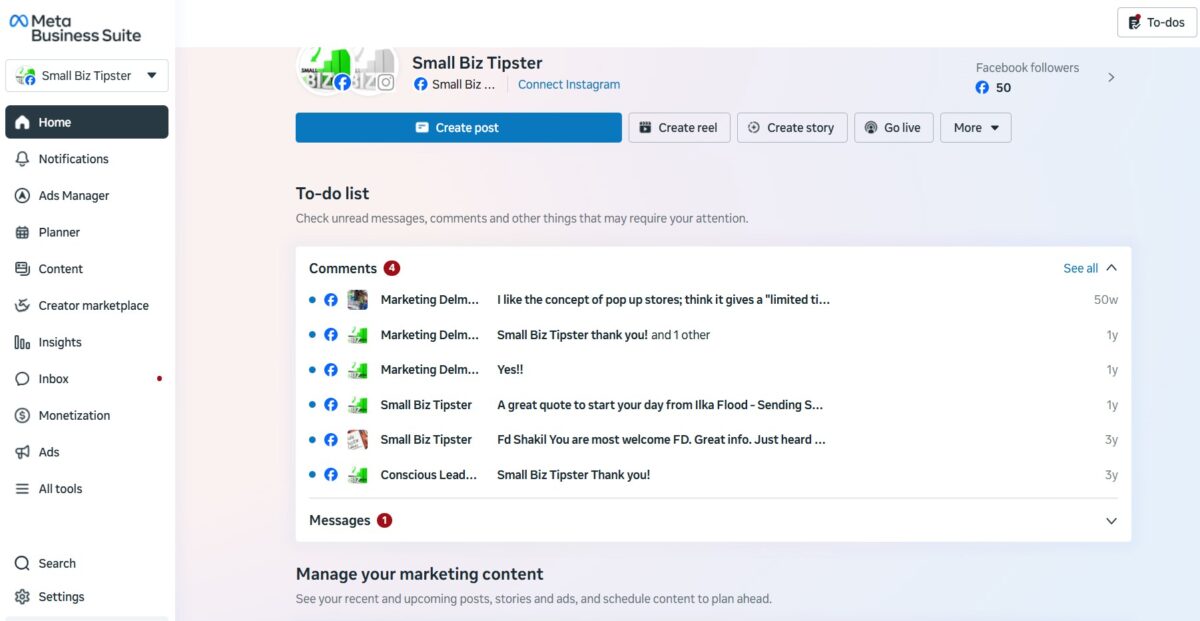
You can:
- Schedule posts for Content Creation
- Answer comments and DMs via Messenger for Business
- Review basic insights
- Track leads
- Give team members access without handing over personal logins
Access it on desktop or through the Business Suite App on mobile for on-the-go Social Media Marketing. In plain English, Meta Business Suite helps you keep marketing and customer messages from turning into a pile of sticky notes.
Switch to the Business Suite App for Instagram for Business insights or WhatsApp Business App integration wherever you are.
If you want a hands-on look at how the dashboard works, this guide to Meta Business Suite shows the main setup and daily tasks for Content Creation and Social Media Marketing. That’s support in the practical sense.
It saves time, even if it doesn’t give you a real person on demand.
Where Meta offers help, education, and ad support
When you need answers, Meta usually points you toward self-serve resources first. The Meta Help Center is the main hub for troubleshooting, account setup, commerce help, and policy questions.
You’ll also see in-app tips and guided steps inside Meta Business Suite and Ads Manager, plus Small Business Resources like Meta Blueprint courses and the Creative Hub for visual assets.
That system works best when your problem is simple. For example, if you need to set up a Page, connect an Instagram for Business account, or fix a basic ad issue, you can often move forward fast using the Meta Help Center.
Once the problem gets tied to reviews, access, billing, or disabled assets, the process can slow down. Check the Meta Help Center support exists, but it may feel more like a maze than a front desk.
Is Meta actually helpful for small businesses, or mostly self-service?
The honest answer is both. Meta is often helpful as a toolset, but less reliable as high-touch support.
That difference matters. If you judge Meta by how well it helps you with:
- Content Creation
- Customer Engagement
- Targeted Advertising
- Measuring Ad Campaign Performance through Page Insights
If you judge it by how fast a human solves a stressful account issue, your experience may be mixed.
Where Meta Small Business Support works well for lean teams and local brands
For a small team, Meta’s value is easy to see. You get free core tools for Content Creation, access to large audiences through Targeted Advertising and Personalized Ads powered by Audience Insights, and simple ways to boost Customer Engagement where buyers already spend time.
That can feel like having an extra part-time assistant, minus the payroll.
A local shop, salon, coach, or home service business can do a lot with basic Content Creation, Boosted Posts, and message replies for Lead Generation. You can post a weekend promotion using Personalized Ads, answer booking questions to build your Online Presence, and send customers to Instagram or WhatsApp without first building a complex system.
Because the tools sit in one place with Social Media Marketing features like Page Insights, you waste less time bouncing between tabs. It even supports Community Building through everyday interactions.
Meta helps most when you need day-to-day marketing support, not emergency rescue.
Where small business owners still get frustrated
The pain points are real. First, support can be hard to reach when the issue is urgent. Next, the learning curve gets steeper once you move past Boosted Posts and into Facebook Ads Manager for advanced Targeted Advertising, Personalized Ads, and Marketing Automation.
Also, if an ad account, payment method, or business asset hits a snag, you may wait longer than you want, especially when tracking Ad Campaign Performance or Conversion Tracking via Audience Insights.
That’s where Meta Small Business Support feels thin. Serious advertisers often need more control than Business Suite offers, so they end up using Facebook Ads Manager anyway for Conversion Tracking and Customer Engagement goals.
If you run into a billing issue, the Meta ad support options can help, but the process may still feel impersonal, even with Facebook Ads Manager’s Social Media Marketing tools. (A few years back, I was able to chat with a Facebook rep for my business accounts, which made it easier.)
For a small business owner, that’s the hard part. Your problem is personal, even if the platform treats it like a ticket.
How to decide if Meta Small Business Support is enough for you
The best test is simple: look at how you handle social media marketing now, how fast you need help, and how much risk you can handle if something breaks. (And you know it usually does break!)
This quick view can help:
| If this sounds like you | Meta is probably enough | You may need more support |
|---|---|---|
| You post on Facebook or Instagram for Business often | Yes, via Meta Business Suite | |
| You want one free dashboard for content and messages | Yes, try the Business Suite App | |
| You run simple local ads with boosted posts | Yes, using targeted advertising | |
| You need fast live help for urgent issues | Yes, check the Meta Help Center | |
| You manage complex funnels or many locations | Yes | |
| You need deep CRM and reporting with audience insights | Yes |
The takeaway is clear: Meta Business Suite fits best when you want strong tools for customer engagement and can handle some self-service.
Good signs Meta is a strong fit for your business
Meta Business Suite is a good fit if you already handle social media marketing on Facebook or Instagram for Business and want a single place to manage content, replies, Messenger for Business, and basic ads via Facebook Ads Manager.
It also makes sense if your team is small, your budget is tight, and you want to test newer AI-powered monetization tools as they roll out later in 2026.
You’ll likely get the most value if your goals are simple, like:
- Lead generation
- Local promotions with personalized ads
- Appointment requests
- Quick customer engagement
In that setup, Meta Small Business Support can be useful because the platform’s tools, including e-commerce and community-building features, do most of the heavy lifting.
Explore the Meta Help Center and small-business resources, such as Meta Blueprint, to build your digital marketing strategy and strengthen your online presence.
Signs you may need extra tools or outside help
You may need more than Meta Business Suite if your business depends on fast live support from the Meta Help Center, detailed reports, or advanced ad flows with targeted advertising and personalized ads.
The same goes if you manage multiple locations, focus on monetization tools for community building, or can’t afford delays when account access goes wrong.
In those cases, Meta Business Suite can still be part of your system for Instagram for Business and Messenger for Business. It just shouldn’t be the only system you trust. A backup process for customer engagement, lead generation, and ad reporting, perhaps with ad credits or small business funding, can save you a lot of stress later.
Use the Business Suite App and Meta Help Center to strengthen your online presence through targeted advertising and social media marketing.
Meta Small Business Support is there, but mostly through tools, education, and built-in features, not white-glove help. For everyday social media marketing and customer engagement, that can be more than enough, especially if you run a lean team.
Conclusion: Metal Small Business Support
Still, you shouldn’t expect perfect direct support when problems get messy. The smart move is to match Meta to your real needs, then decide where you need backup.
If the platform already brings you leads and conversations, use it hard, but don’t depend on it blindly. Meta Small Business Support shines at helping you grow your business with these technology options.

I’m Lisa Sicard, founder of Inspire To Thrive.
Small Biz Tipster is my dedicated space for straightforward, no-nonsense tips that help small business owners grow smarter and faster. Voted in the Top 100 Small Business Blogs by Feedspot for 2025 and 2026, and with over 30 years of hands-on digital marketing experience, I share simple strategies here so you can save time on social media, attract more customers, and focus on what you love — running your business. Through Inspire To Thrive, I also provide social media management, training, and consultations.