Growth often exposes operational problems that were easy to overlook when a business had fewer customers, employees, and moving parts. Manual handoffs take longer, information gets trapped in separate systems, and routine decisions begin consuming too much staff time.
Table of Contents
The Power of Custom AI Workflows in Business
Custom AI workflows can relieve that pressure by connecting tasks, data, and decision points in a repeatable process. They help teams handle greater volume without adding the same amount of administrative work. The key is to apply AI to clearly defined operational needs, measure the results, and keep people involved where their judgment matters.
What makes an AI workflow custom
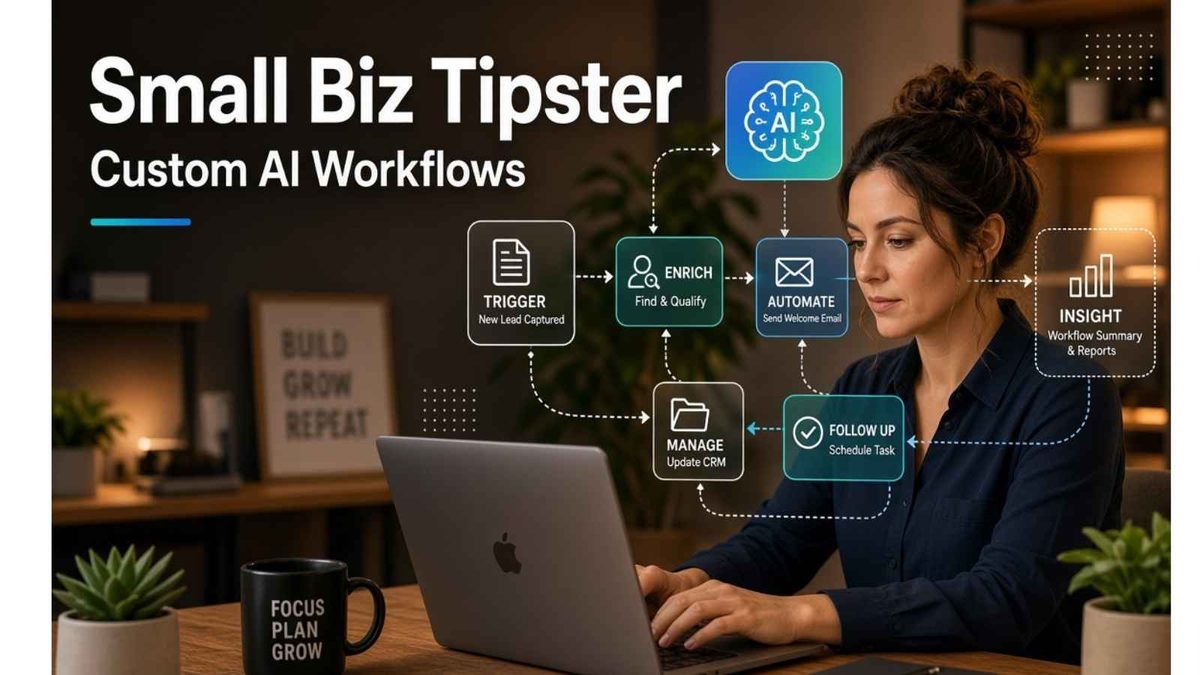
An AI workflow is a connected series of steps in which an AI model interprets information, creates an output or recommends an action. A custom workflow is designed around the way your business already operates, including its approval rules, software and service standards.
Consider a company that receives hundreds of customer emails each week. A custom workflow could identify each message’s topic, check the customer’s account details, and prepare a suggested response. Billing questions might go to the finance team while urgent service issues receive priority in the support queue. Employees still control sensitive decisions, but they spend less time manually sorting messages.
That level of specificity separates a useful workflow from a general-purpose chatbot. According to an overview of enterprise operational efficiency, AI can support functions such as predictive maintenance, process optimization, and resource allocation. Each use depends on relevant business data and a clearly mapped process.
Before selecting a model or platform, document the current process from beginning to end. Identify what triggers the work, which information employees need, where approval occurs, and what counts as a completed task. This map provides developers with a practical blueprint and helps managers identify steps that should be removed before any automation begins.
Choose processes that are ready to scale
Start with high-volume work that follows recognizable patterns. Repetitive tasks tend to provide clearer returns because small time savings accumulate across hundreds or thousands of transactions. Good candidates include sorting support requests, extracting details from documents, preparing standard reports, and updating product information.
Content production can also benefit when the requirements are predictable. An online retailer, for example, may need several visual concepts for each new product page. Developers can integrate an image generation API into an internal application so approved users can create and modify images as part of a controlled production workflow. Brand review and final approval can remain with the creative team.
Avoid choosing a process simply because it takes a long time. First, find out why it takes so long. Automation may reproduce confusion at a higher speed if employees follow inconsistent rules or work with incomplete data. Guidance on scaling with AI automation emphasizes the value of matching automation to specific business processes and growth demands.
A simple scoring method can help you compare opportunities. Rate each process based on monthly volume, hours spent, error frequency, data availability, and business impact. A weekly report that takes 10 hours and follows fixed rules may be a stronger first project than a rare strategic decision that requires extensive context.
Build around clean data and clear controls
AI outputs reflect the information available to the workflow. Customer records with missing fields, outdated product details, or inconsistent naming conventions will reduce accuracy. Before development starts, assign ownership of each data source and establish rules for error correction.
Access controls also need attention. A workflow should receive only the information required for its assigned task. If a system prepares invoice reminders, for example, it may need customer contact details, payment status, and due dates. It probably doesn’t need access to employee files or unrelated customer conversations.
Setting Boundaries for custom AI Workflows
Set clear boundaries for actions the system can complete automatically. Low-risk steps such as categorizing an inquiry or drafting an internal summary may require little oversight.
Refunds, contract changes, and messages involving sensitive complaints should pass to an authorized employee. This tiered structure allows the business to gain speed without giving software unrestricted control.
Testing Custom AI Workflows
Testing should use realistic cases, including incomplete requests, unusual wording, and conflicting data. Keep a record of the input, output, employee correction, and final outcome. Those records reveal recurring problems that may require a prompt change, a new business rule, or better source data.
A formal privacy and retention policy completes the control structure. Document what information enters the workflow, where it is stored, who can review it, and when it will be deleted.
These decisions should be settled before the workflow handles live customer or company data.
Connect tools without creating more complexity
Many businesses already use separate systems for customer relationships, accounting, inventory, and team communication. A useful AI workflow moves information between those tools while maintaining one reliable source of truth. It should reduce duplicate entry rather than introduce another isolated dashboard.
Imagine a service company that receives requests through an online form. The workflow could summarize the request, match it with the correct service category, create a record in the customer management system, and notify the assigned employee.
Once the employee confirms the appointment, the workflow could update the customer’s record and prepare a confirmation message.
Safeguards in Place for Custom AI Workflows
That sequence needs safeguards for common exceptions. A returning customer’s new request could be linked to an existing account instead of creating a duplicate. Missing contact information could trigger an internal review. Requests outside the company’s service range could follow a separate response path.
Practical AI operations strategies cover areas such as task management, knowledge access, and customer support. Yet every new connection also creates a maintenance responsibility. Changes to an application, form field, or internal policy can affect the entire chain.
Assign one owner to each workflow and keep a simple diagram of its systems, triggers, and decision rules. The owner doesn’t need to write code, but that person should understand the intended outcome and know whom to contact when performance changes.
Clear ownership prevents an automated process from quietly failing after a software update.
Measure results beyond time saved
Hours saved provide an easy starting metric, but they don’t tell the whole story. A faster process has limited value if it creates more corrections, frustrates customers, or shifts work to another department.
Choose a small set of measures before launching the workflow. Depending on the process, these may include:
- Average completion time.
- Cost per completed task.
- Error and correction rates.
- Percentage of cases requiring human review.
- Customer response time.
- Employee adoption rate.
Record a baseline for at least a few weeks. If employees currently spend 20 minutes processing each request, document the volume, error rate, and total labor involved. After launch, compare the same measures at 30, 60, and 90 days. This makes it easier to separate genuine improvement from a temporary burst of enthusiasm.
The employee review rate deserves particular attention. A workflow that sends 90 percent of cases to a person may not be ready for wider use. One that automates 85 percent but makes costly mistakes may also need to be redesigned. Track both independence and accuracy.
Detailed guidance on AI workflow automation discusses workflow design, orchestration, and monitoring. For a growing company, monitoring should also include employee feedback. People who use the process every day will often notice awkward handoffs before they appear in a monthly report.
Expand one proven workflow at a time
A pilot gives the team a controlled way to test assumptions. Select one department, one task, and a limited group of users. Define the expected result, set a review date, and decide in advance what would justify expansion.
Suppose a business pilots an AI-assisted support workflow with three employees for six weeks. The target could be a 25 percent reduction in initial response time while maintaining the existing customer satisfaction score. Weekly reviews would examine misclassified messages, edited responses, and cases that needed escalation. That evidence provides a stronger basis for investment than a demonstration based on idealized examples.
Once the pilot meets its targets, standardize it before increasing volume. Write down operating rules, approval points, fallback procedures, and ownership. Train employees on how to report a problem and when to ignore an AI recommendation.
A short internal guide is often more useful than a long technical manual.
Expansion
Expansion should align with the company’s broader growth plan. Small business owners who are adding staff, markets, or service lines can use this guide to scale their business to connect operational changes with cash flow, hiring, and customer experience.
The strongest signal that a workflow is ready to scale is predictability. When the team understands its performance, exceptions, and maintenance needs, the business can extend it to more users or related processes without relying on guesswork.
Conclusion: Custom AI Workflows For Small Businesses
Custom AI workflows work best when they solve a visible operational constraint. Pick a process with stable rules and measurable volume, then use a limited pilot to prove that it can deliver accurate results under everyday conditions.
That evidence will show you exactly where automation can support the next stage of growth.
Have you developed custom AI workflows for your small business? I’d love to hear about it in the comments below. 👇
Disclosure: This Small Biz Tipster blog post may contain affiliate links. I may earn a commission from qualifying purchases at no extra cost to you. Some sections were drafted with AI tools and carefully reviewed/edited by me.

I’m Lisa Sicard, founder of Inspire To Thrive.
Small Biz Tipster is my dedicated space for straightforward, no-nonsense tips that help small business owners grow smarter and faster. Voted in the Top 100 Small Business Blogs by Feedspot for 2025 and 2026, and with over 30 years of hands-on digital marketing experience, I share simple strategies here so you can save time on social media, attract more customers, and focus on what you love — running your business. Through Inspire To Thrive, I also provide social media management, training, and consultations.