
A complex data request can quickly expose gaps in a company’s filing, access, and retention practices. One customer may request all records associated with their account, including emails, support tickets, invoices, and activity logs. Even a small business can end up searching several platforms and reviewing hundreds of files. Streamlining your data request intake process can significantly improve efficiency.
A clear response process keeps that work controlled. You need to confirm the scope, assign responsibility, collect records without altering them, and securely deliver the approved material. The following steps help reduce missed records, privacy errors, and last-minute confusion.
Implementing a structured data request intake process is essential for effective management of information requests.
Table of Contents
The Reality of Data Access Requests
Start by identifying what the requester wants and which rules apply. A request may come from a customer, employee, attorney, regulator, or internal manager. Each situation may involve different deadlines and disclosure requirements, so record the date received, the requester’s wording, relevant accounts, and the assigned owner in a single case file.
Identity verification should happen before anyone searches for or releases personal records.
Use a method that matches the sensitivity of the data. Asking someone to confirm access to an established email account may work for a routine request, while payroll or financial information may call for stronger checks.
Avoid Collecting More Verification Data Than You Need
The request’s wording also matters. “Send me everything” could cover years of emails, purchase records, and service notes. Ask focused questions when the scope is unclear, but don’t use clarification as a reason to leave the case idle. Guidance on the right of access can help teams understand the common stages in the process, though legal obligations vary by jurisdiction.
Create a response calendar with internal deadlines that precede the official due date. Allow time for collection, duplicate removal, review, and approval. Effective subject access request controls also depend on knowing where personal information lives before a request arrives.
👉 A current data inventory turns an organization-wide search into a defined set of checks.
Gathering Information Across Systems with a Data Request Intake Process
Build a source list before running searches. Typical locations include:
customer relationship management software, shared drives, accounting platforms, email accounts, cloud storage, help desk systems, and archived databases.
- Note the system owner.
- Search terms.
- Date range.
- Export method for each source.
This creates a repeatable plan and prevents two employees from doing the same work.
Use stable identifiers wherever possible. A customer’s name may appear in several formats, whereas an account number or a verified email address usually yields cleaner results.
👉 Search known aliases and previous contact details when the request covers a long relationship. Keep original exports in a restricted working folder and use copies for review so source material remains unchanged.
Large Exports
Large exports can also create practical delivery problems. If the final records are saved as PDFs and exceed a portal’s upload limit, a PDF compressor can reduce file size for easier uploading, sharing, or storage while maintaining visible quality.
Check the compressed copy page by page before release, especially when the source contains scanned text, signatures, or small tables.
Access should remain limited during collection. Give each team member only the systems and folders needed for the task, then remove temporary permissions when the case closes. These data access management tactics can reduce unnecessary exposure in both routine operations and formal requests.
👉 Maintain a simple collection log throughout the search. Record who checked each system, when the search occurred, which terms were used, and how many files were exported. If a source produced no results, document that outcome too.
Packaging Data Request Intake Process Records for Secure Delivery
Review every collected record before placing it in the delivery package. Remove exact duplicates and separate files that fall outside the approved scope. A message thread, for example, may include another customer’s contact details or confidential internal discussion.
Flag those sections for an authorized reviewer instead of deleting content informally.
Use a predictable folder structure when the response includes several file types. You might organize records into account information, correspondence, transactions, and support history.
Add a short index that lists each folder, the covered dates, and the file format. Clear labels such as `Invoices_2024-01_to_2024-12.pdf` are more useful than filenames created automatically by an export tool.
Open every file after conversion or compression. Confirm that pages appear in order, text remains readable, and attachments haven’t disappeared.
👉 Searchable PDFs help recipients locate information, but optical character recognition can introduce errors, so compare critical names, dates, and amounts with the source.
Data Request Intake Process with Delivery
Choose delivery based on sensitivity and size. An authenticated portal with expiring access is generally safer than an ordinary email attachment. If encryption or a password-protected archive is appropriate, send the password through a separate channel. Never place the access code in the same message as the files.
Document what you excluded and why, then get the required approval before release. Sound access request practices emphasize ownership, clear workflows, and controlled approvals.
👉 Those controls matter because a complete response can still pose a risk if it reaches the wrong person or contains unrelated personal data.
Maintaining a Verifiable Audit Trail
Treat the case log as part of the response, not an administrative afterthought. It should show when the request arrived, how identity was checked, who approved the scope, and which systems were searched.
Add the review dates, delivery method, and confirmation that temporary access was removed.
Preserve evidence of each decision. If a reviewer redacts a third party’s email address, record the file name, page, and reason. If an archive is unavailable because it passed its approved retention period, note the retention rule and deletion date if known.
👉 This level of detail helps a manager reconstruct the process months later without relying on anyone’s memory.
Keep logs concise and factual. Avoid copying sensitive content into tracking notes when a file reference will do. Store the audit record in a controlled location with its own retention schedule, since keeping case material forever can create another source of risk.
Problems to Solve
Recurring problems should feed back into normal business operations. If every request requires a manual search through former employees’ folders, assign ownership and correct the filing process. The hidden costs of poor data governance often appear through repeated searches, uncertain retention, and avoidable review hours long before they show up as a major incident.
Close the case only after confirming delivery and recording the final file list.
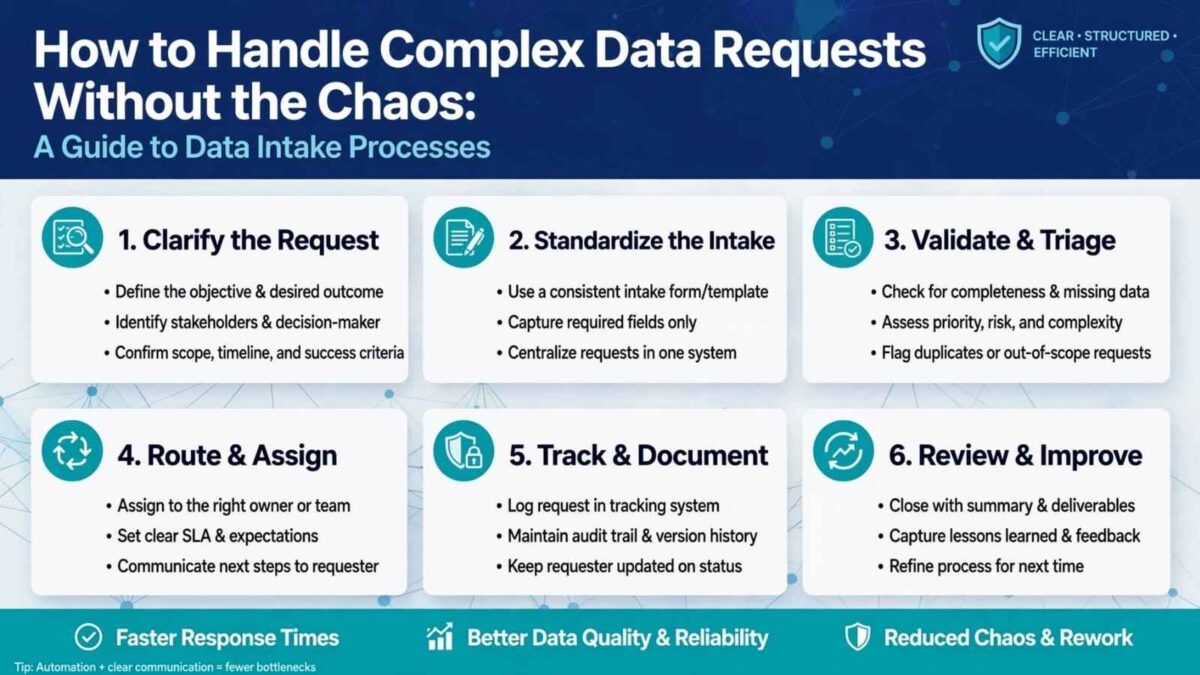
Review of a Data Request Intake Process
A brief closure review can then identify one concrete improvement, such as adding a missing system to the data inventory or standardizing export names. That final record provides the next request with a cleaner starting point and leaves a clear record of what your business released.
Disclosure: This Small Biz Tipster blog post may contain affiliate links. I may earn a commission from qualifying purchases at no extra cost to you. Some sections were drafted with AI tools and carefully reviewed/edited by me.

I’m Lisa Sicard, founder of Inspire To Thrive.
Small Biz Tipster is my dedicated space for straightforward, no-nonsense tips that help small business owners grow smarter and faster. Voted in the Top 100 Small Business Blogs by Feedspot for 2025 and 2026, and with over 30 years of hands-on digital marketing experience, I share simple strategies here so you can save time on social media, attract more customers, and focus on what you love — running your business. Through Inspire To Thrive, I also provide social media management, training, and consultations.