A countdown timer gives an email a clear time frame and helps readers understand when an offer, registration period, or event will end. That visual cue can turn a vague deadline into something immediate and easy to grasp, especially when you aim to optimize email marketing.
Still, a timer alone won’t rescue a weak campaign. It works best when the deadline is genuine, the message has a focused purpose, and the landing page matches what the email promises.
Small businesses can achieve stronger results by treating the timer as part of a well-planned email marketing campaign designed to optimize performance.
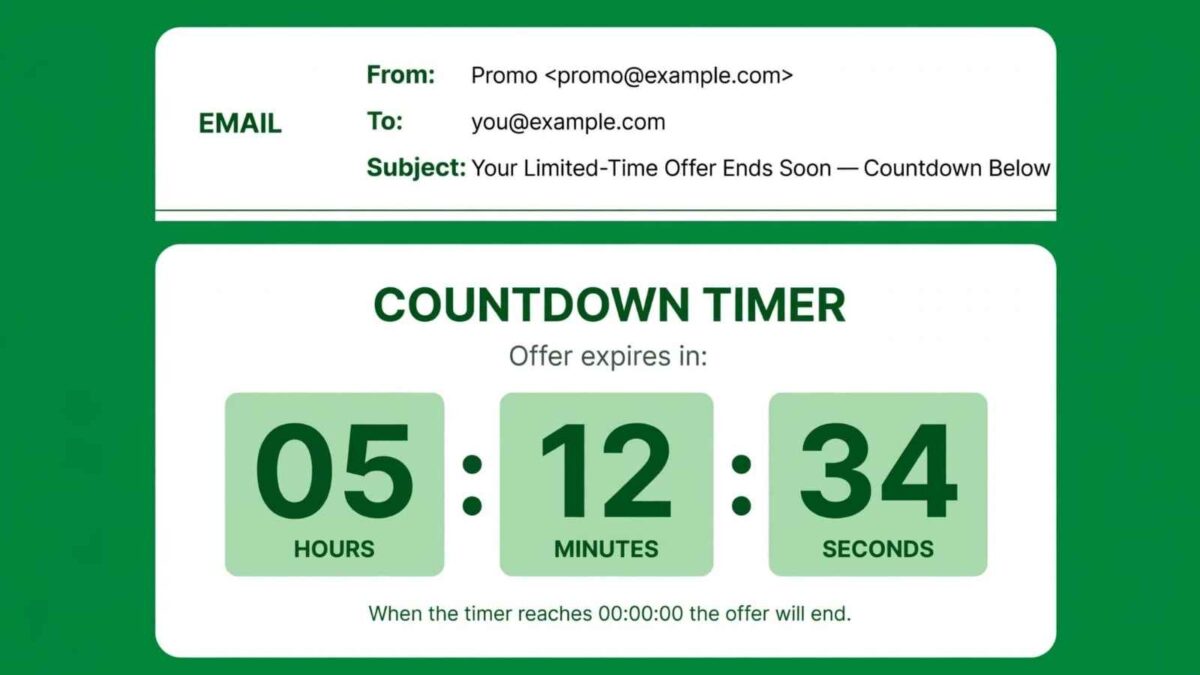
Table of Contents
Why visual timers capture attention
Most subscribers scan promotional emails quickly. A timer stands out because its numbers change and communicate useful information at a glance. Readers don’t need to search through several paragraphs to learn how much time remains.
Guidance on email countdown timers highlights their ability to support clicks and conversions. The format can work especially well for a product launch, webinar registration, or seasonal promotion.
For example, a timer showing 18 hours remaining gives the reader a more concrete prompt than a line saying an offer ends soon. The surrounding copy should explain exactly what expires when the countdown reaches zero.
Choose a timer that fits the campaign to Optimize Email Marketing
Start with the practical details. Your timer needs to:
- Display correctly in common email clients.
- Fit a mobile screen.
- Reflect the recipient’s time zone when appropriate.
- Match the email’s colors and visual style without overwhelming the main message.
Small businesses that need a straightforward option can create customizable countdown timers for email campaigns and adjust their appearance to fit the promotion. Place the timer near the primary call to action so readers can connect the deadline with the next step.
👉 Always send test emails to several devices and inbox providers before launching the campaign. A fallback image or expiration message can help when an email client limits dynamic content.
Build the message around a real deadline
Artificial urgency can damage trust, particularly when subscribers see the same “final hours” promotion several days in a row. Use a deadline tied to an actual business event, such as registration closing at 5 p.m., a sale ending Friday or a limited booking window reaching its cutoff.
The subject line, timer and landing page should all show the same end time. If an early-bird price expires at noon on Tuesday, state that detail plainly throughout the campaign. Plan what happens after expiration too.
👉 The destination page should show that the offer has ended, present the standard price, or direct visitors to another useful option. This avoids disappointing someone who opens the email late.
Pair urgency with a clear call to action to optimize email Marketing Campaigns
A timer draws attention, but the call to action tells the reader what to do. Use a specific button label such as “Reserve Your Seat,” “Start Your Trial,” or “Shop the Sale.” Keep competing links to a minimum so the email has one obvious path.
Strong email marketing campaigns also depend on relevant offers and clear messaging. A timer should support those basics.
Consider a workshop email that includes the session topic, date, price, and remaining registration time above one button. That structure answers the reader’s main questions without forcing them to hunt for details.
👉 If the offer needs a long explanation, summarize it in the email and provide the full details on the landing page.
Test timing, placement, and results of Email Marketing Strategy
Run a controlled test before adding timers to every promotion. Split a comparable audience into two groups, sending one group a version with a timer and the other without.
Keep the subject line, offer, send time, and button copy the same so the timer remains the main variable.
Track click-through rate, conversion rate, and unsubscribe rate. Open rates alone won’t show whether the timer influenced action after the email was viewed.
You can also test placement near the top of the message against placement beside the call-to-action button. Give the test sufficient volume to yield useful results, and record the setup for future campaigns.
👉 If the timer increases clicks but conversions stay flat, review the landing page and offer before changing the email again.
Use countdowns selectively to Optimize Email Marketing
Frequent countdowns can make every message feel like an emergency. Save them for campaigns where time genuinely affects the reader’s decision, such as enrollment periods, launch windows and appointments with a fixed booking cutoff. Regular newsletters, educational updates and routine announcements usually don’t need one.
A simple campaign calendar can prevent overuse. Mark which emails contain deadlines and leave room for useful messages that teach, update, or build customer relationships. When the next time-sensitive campaign arrives, the visual timer will carry more weight because subscribers haven’t seen one in every email.
👉 Set it to expire at the exact time shown in your copy, then confirm that the post-deadline page is ready before pressing send.
Have you been optimizing your email marketing campaigns with timers? I’d love to hear more in the comments below.
Disclosure: This Small Biz Tipster blog post may contain affiliate links. I may earn a commission from qualifying purchases at no extra cost to you. Some sections were drafted with AI tools and carefully reviewed/edited by me.

I’m Lisa Sicard, founder of Inspire To Thrive.
Small Biz Tipster is my dedicated space for straightforward, no-nonsense tips that help small business owners grow smarter and faster. Voted in the Top 100 Small Business Blogs by Feedspot for 2025 and 2026, and with over 30 years of hands-on digital marketing experience, I share simple strategies here so you can save time on social media, attract more customers, and focus on what you love — running your business. Through Inspire To Thrive, I also provide social media management, training, and consultations.